English

HDMI vs DisplayPort: Which Is Better for You?
Choosing the right video interface is a foundational decision that affects performance, compatibility, and system design.
Whether you’re building an embedded product, designing an interactive kiosk, or setting up a professional workstation, knowing the strengths and limitations of HDMI and DisplayPort is essential.
While both interfaces are capable of transmitting high-definition video and audio, they were built for different use cases and continue to evolve along distinct paths.
In this guide, we’ll break down their technical differences, real-world applications, and key considerations so you can choose the best option for your project, now and into 2025.
What Are HDMI and DisplayPort?
HDMI (High-Definition Multimedia Interface) and DisplayPort are digital interfaces used to transmit video and audio from a source device — like a computer, media player, or embedded controller — to a display.
Both standards carry uncompressed high-quality signals, but they were developed with different goals and markets in mind.
HDMI was introduced in 2003 and is the dominant interface for consumer electronics like TVs, home theater systems, game consoles, and laptops.
Its focus has been broad compatibility, ease of use, and integration of both video and multi-channel audio, including support for features like ARC (Audio Return Channel) and CEC (Consumer Electronics Control).
DisplayPort, introduced in 2006 by VESA, was designed for computer and professional display applications. It offers higher bandwidth potential, support for daisy-chaining multiple monitors (Multi-Stream Transport), and advanced features like Adaptive Sync, making it a favorite in high-performance setups, workstations, and industrial environments.
While both interfaces serve a similar core function, the differences become clear in high-resolution applications, embedded systems, and professional use cases where performance, flexibility, and reliability are non-negotiable.
Technical Comparison Between HDMI and DisplayPort
Choosing between HDMI and DisplayPort is about selecting the right tool for your project. Here’s a closer look at how they compare across key technical aspects:
Bandwidth
Bandwidth dictates how much data the interface can carry, directly impacting maximum resolution, refresh rate, and color depth.
- HDMI 2.1 offers a maximum bandwidth of 48 Gbps using four differential pairs. This allows support for resolutions up to 10K at 120Hz with compression (DSC), or 8K at 60Hz uncompressed.
- DisplayPort 2.1, on the other hand, provides up to 80 Gbps with its 4-lane configuration, 77.4 Gbps of effective data rate. It’s capable of driving multiple 4K displays at high refresh rates, or even a single 16K display using DSC.
For systems requiring multiple displays, high refresh rates, or deep color depth (like in medical imaging, simulators, or control rooms), DisplayPort’s bandwidth advantage can make a real difference.
Supported resolutions and refresh rates
Both HDMI and DisplayPort have evolved to support ultra-high resolutions, but DisplayPort offers more headroom for demanding setups.
If your application relies on fast rendering, crisp motion, or large-format displays (e.g., interactive signage, simulation, advanced GUIs), DisplayPort’s flexibility at high resolutions is unmatched.
Audio capabilities
While video is the headline, audio support can also be a key factor in some applications.
- HDMI natively supports multi-channel audio (up to 32 channels), including advanced formats like Dolby Atmos, DTS:X, and eARC (enhanced Audio Return Channel), making it ideal for multimedia and entertainment systems.
- DisplayPort supports up to 8 channels of LPCM audio at 24-bit/192 kHz. Though this is more than enough for most applications, it lacks some of HDMI’s consumer‑oriented audio features.
If you’re developing an interface for infotainment systems or environments where rich audio playback matters, HDMI’s integrated features give it the edge.
HDR support and adaptive sync (G-Sync/FreeSync)
High Dynamic Range (HDR) and Adaptive Sync are now expected in modern display applications, from gaming to digital signage and industrial visualization.
- HDR: Both HDMI and DisplayPort support HDR10 and Dolby Vision. HDMI 2.1 brings dynamic HDR metadata support, enhancing image quality on a scene-by-scene basis. DisplayPort 1.4 and newer also support dynamic HDR with HDR10+;
- Adaptive Sync: DisplayPort was the first to implement Adaptive Sync, and it remains the native standard for technologies like AMD FreeSync and NVIDIA G-Sync. HDMI has caught up with VRR support in version 2.1, but it often depends on manufacturer implementation.
In environments where smooth, tear-free graphics are critical (such as 3D rendering, control systems, or immersive interfaces) DisplayPort’s adaptive sync and refresh capabilities offer a significant advantage.
Device Compatibility
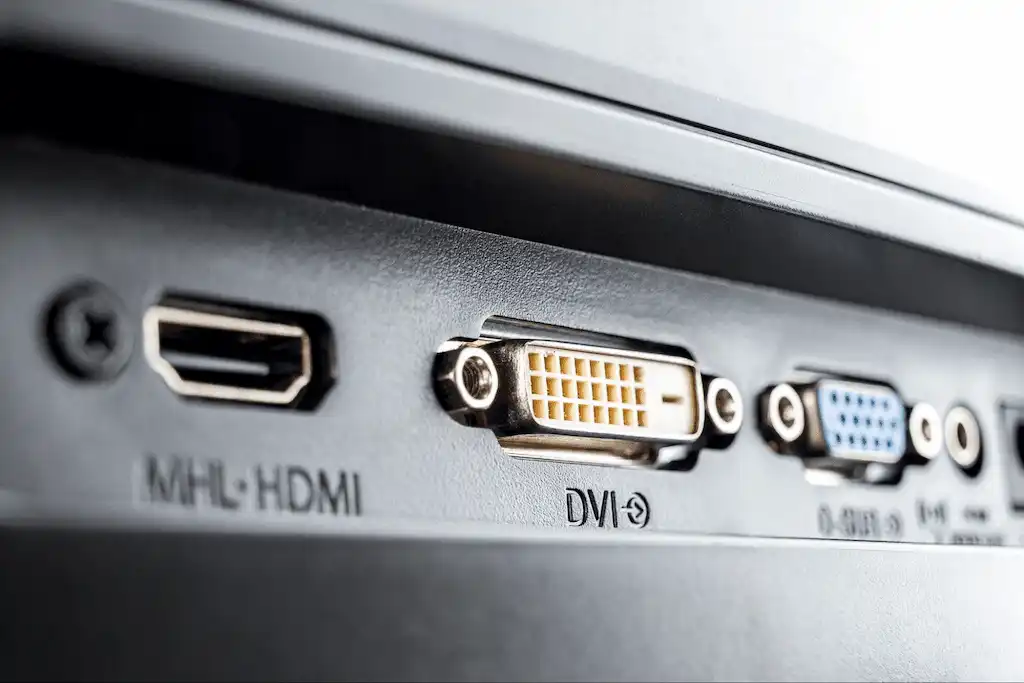
When choosing between HDMI and DisplayPort, hardware compatibility often becomes the deciding factor, especially in embedded systems or product development environments.
HDMI is the clear winner in terms of ubiquity. It’s found on virtually all TVs, monitors, media players, projectors, and embedded single-board computers (SBCs) like Raspberry Pi and NVIDIA Jetson.
If your application involves consumer electronics or needs guaranteed plug-and-play support across a wide range of devices, HDMI is a safe bet.
DisplayPort, on the other hand, is primarily geared toward professional and computing environments. It’s common on desktop GPUs, workstations, high-end monitors, and industrial PCs.
Many embedded x86 platforms (like Intel NUCs or mini-ITX boards) include DisplayPort either natively or via USB-C with DP Alt Mode.
Here’s another important distinction:
- HDMI supports Consumer Electronics Control (CEC), allowing control signals across devices, which is helpful for media-based or smart-display applications.
- DisplayPort supports Multi-Stream Transport (MST), enabling multiple monitors to connect through a single port, highly valuable in control rooms or multi-display HMI environments.
If your project must integrate with consumer-facing displays, HDMI offers broader out-of-the-box compatibility.
If you’re building a high-resolution industrial interface, DisplayPort might better align with your platform.
HDMI vs DisplayPort in 2025: Does It Still Matter?
Absolutely! In fact, it matters more than ever. While both HDMI and DisplayPort have matured significantly, the rapid evolution of display technology, GPU capabilities, and embedded system requirements in 2025 keeps this decision relevant.
HDMI 2.1 is now a standard feature in most consumer and embedded boards, offering support for 4K@120Hz, 8K@60Hz, and advanced audio features.
It ensures reliable compatibility across TVs, touch monitors, and compact systems, making it a safe, plug-and-play solution for many real-world applications, from kiosks to control panels.
On the other hand, DisplayPort 2.1 has become the interface of choice for high-performance environments.
Its higher bandwidth (up to 80 Gbps), native adaptive sync support, and multi-stream transport (MST) capabilities make it ideal for multi-display industrial setups, simulation systems, and design workstations where screen performance directly impacts productivity.
As screen resolutions, refresh rates, and user expectations continue to grow, the choice between HDMI and DisplayPort in 2025 should align with the specific technical demands of your application, not just convenience.
Choose the Best Displays with Proculus Tech
Whether you’re developing an industrial control system, a retail touchscreen kiosk, or a next-gen embedded interface, Proculus Technologies offers display solutions built to perform under real-world conditions.
Our HDMI IPS touchscreen displays are engineered for seamless integration with Raspberry Pi, Windows/Linux/Android systems, and embedded PCs.
Designed with reliability and responsiveness in mind, they support crisp visuals, multitouch interaction, and plug-and-play HDMI connectivity, all in a durable, low-power form factor.
Need something even more customizable?
Explore our UART or Android-based smart displays, where you can build entire GUIs without writing complex code, using our UnicView Studio. You get full control over layout, I/O, and behavior, perfect for prototyping and scaling embedded products.
Conclusion
Choosing between HDMI and DisplayPort is a strategic decision that impacts performance, compatibility, and development time.
For simple setups and broad device compatibility, HDMI remains a solid standard.
For advanced visual output, high bandwidth requirements, or multi-display configurations, DisplayPort provides the edge.
At Proculus, we help engineers and developers make informed hardware choices. With a wide range of intelligent display modules (and a team ready to support your development from prototype to deployment) we’re here to simplify your journey.
Let your interface do more. Let us help you build it.