 English


Blog
Monitor Response Time Explained: How It Affects Display Performance and Buying Decisions
 Monitor response time is an important specification when evaluating display performance, particularly for applications involving moving graphics, real-time information, or interactive interfaces.
It describes how quickly a pixel transitions between colors, directly influencing motion clarity and the visibility of ghosting or trailing effects.
However, a lower response time does not automatically mean a better display for every application.
While gaming monitors often emphasize extremely fast pixel transitions, industrial control panels, medical equipment, and digital signage systems have different performance requirements.
Understanding monitor response time, how it is measured, and how it relates to other display specifications helps engineers and equipment manufacturers select suitable display technology without paying for unnecessary performance. Keep reading!
What is monitor response time, and why does it matter?
Monitor response time is the amount of time a display pixel takes to transition from one color or brightness level to another. It is typically measured in milliseconds (ms), with lower values indicating faster pixel transitions. When response time is relatively slow, pixels may not complete their transitions before the image changes again. This can produce visible ghosting, motion blur, or trails behind moving elements. The impact depends on the content displayed and the operating environment. For example, fast-moving graphics and video benefit from shorter response times because rapid pixel transitions help maintain image clarity. In contrast, an industrial human-machine interface (HMI) displaying mostly static buttons, numerical readings, and status indicators may not require the same level of motion performance. Response time can influence several aspects of display usability:- Motion clarity: Faster pixel transitions help reduce visible trails behind moving objects.
- Visual accuracy: Appropriate response times help maintain clear transitions between changing graphics and interface elements.
- User experience: Smooth visual updates contribute to readable and intuitive interfaces.
- Application suitability: Different response-time requirements apply to video displays, industrial dashboards, and embedded devices.
How is monitor response time measured?
Monitor response time is measured by observing how quickly display pixels change between specified brightness levels. However, different measurement methods can produce significantly different results, even for the same display. Understanding these methods is essential when comparing technical specifications from different manufacturers.Gray-to-Gray (GtG)
Gray-to-Gray (GtG) response time measures how long a pixel takes to transition between two gray levels. Instead of measuring a complete black-to-white transition, GtG testing examines intermediate luminance changes, which better represent many transitions found in everyday display content. Manufacturers commonly report GtG response times in milliseconds. For example, a display advertised with a 5 ms GtG response time is indicating a measured gray-level transition under specific testing conditions. However, not every gray-level transition occurs at the same speed. A panel may respond quickly to certain transitions while performing more slowly during others, particularly when moving between darker shades. For this reason, a single GtG value does not always represent the complete response-time behavior of a display. Engineers should consider whether the published specification represents an average, a particular transition, or a best-case measurement. Understand this better in the infographic bellow: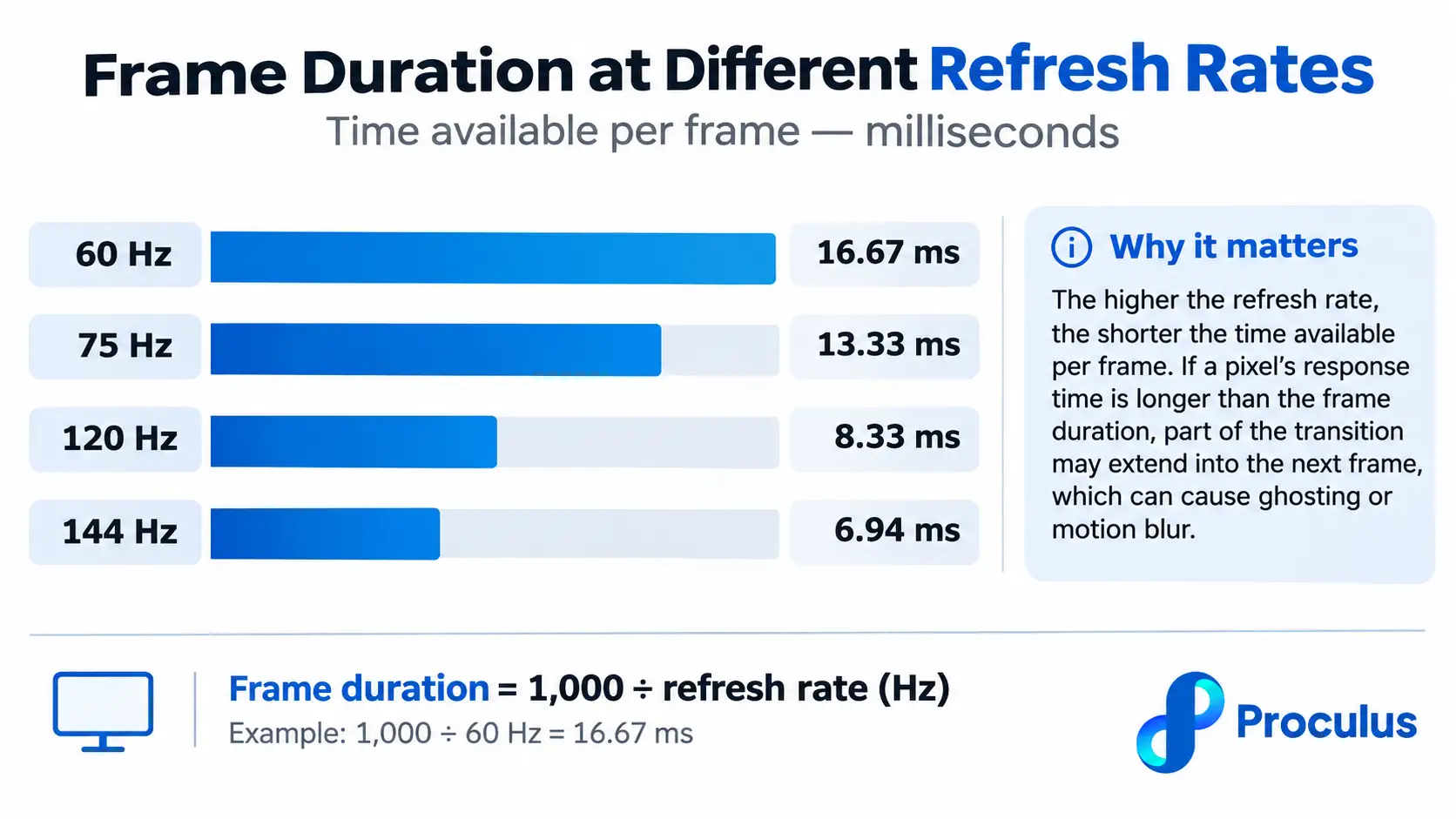
Moving Picture Response Time (MPRT)
Moving Picture Response Time (MPRT) describes perceived motion blur associated with how long moving image information remains visible on a display. Unlike GtG, which focuses on pixel transitions, MPRT is influenced by factors such as frame duration, pixel persistence, and display driving techniques. For example, an LCD panel may have relatively fast GtG transitions but still exhibit noticeable motion blur because each frame remains visible until the next refresh. Some displays use backlight strobing to reduce perceived motion blur. This can improve MPRT results without changing the underlying liquid crystal transition speed. Consequently, a display advertised with a 1 ms MPRT should not automatically be considered equivalent to one rated at 1 ms GtG. The two measurements describe different aspects of display performance and should not be compared as interchangeable specifications.Manufacturer testing methodologies
Manufacturers may use different testing procedures to determine response time, making direct comparisons more complicated. Variations can include the selected gray-level transitions, measurement thresholds, refresh rates, temperature conditions, and pixel overdrive settings. Overdrive technology, for example, applies additional voltage to accelerate LCD pixel transitions. While this can reduce measured response time, excessive overdrive may produce overshoot or inverse ghosting, introducing visible artifacts around moving objects. When evaluating a display, technical buyers should look beyond the advertised number and consider:- Whether the measurement uses GtG, MPRT, or another method.
- The testing conditions and selected transition levels.
- Whether overdrive was enabled during testing.
- The consistency of pixel transitions across different brightness levels.
- The presence of motion artifacts during actual operation.
Frequently Asked Questions about monitor response time
Is a 1 ms response time necessary for business applications?
No. Most business, industrial, and productivity applications do not require a 1 ms response time, especially when displaying primarily static information. Consistent performance, readability, and system compatibility are generally more important.What is the difference between response time and refresh rate?
Response time measures how quickly individual pixels change color, while refresh rate measures how frequently the display presents new frames. Both influence motion clarity, but they describe different display characteristics.Does a lower response time improve digital signage performance?
A lower response time can improve motion clarity in digital signage that frequently displays moving graphics or video. For signage showing static advertisements, menus, or informational content, brightness, viewing angles, and visibility are often more important.Which panel technology offers the fastest response time?
OLED generally provides the fastest pixel response times among common LCD, OLED, and Mini-LED LCD technologies. However, actual motion performance also depends on refresh rate, display driving methods, and other system characteristics.Choose the Right Display Solution with Proculus Technologies!
Selecting a display involves more than comparing response-time specifications. For embedded systems and professional equipment, the right solution must also meet requirements for interface compatibility, visual performance, mechanical integration, and long-term operation. Proculus Technologies offers a portfolio of intelligent TFT LCD modules designed to simplify display integration across industrial, medical, and smart device applications. Our product range includes UART TFT LCD modules for streamlined microcontroller communication, Android display modules for more advanced graphical interfaces, and HDMI displays for integration with compatible embedded computers and control systems. With flexible display options, GUI development tools, and technical support, Proculus helps engineers and manufacturers identify practical display solutions for their projects. Find the display technology that fits your application. Explore our product portfolio and discover LCD modules designed for efficient integration and dependable visual performance. Explore Proculus Display Solutions!

PHP Code Snippets Powered By : XYZScripts.com