 English

Raspberry Pi Projects for Intelligent Displays: Practical Applications from Prototype to Enterprise Deployment
Raspberry Pi projects have evolved far beyond hobby electronics. The platform is now widely used by engineers to prototype intelligent displays, human-machine interfaces (HMIs), kiosks, dashboards, and connected control systems.
Its accessible hardware, broad software ecosystem, and support for common display interfaces make Raspberry Pi particularly useful during early product development. Engineers can validate user interfaces, connectivity, peripherals, and application logic before committing to a production architecture.
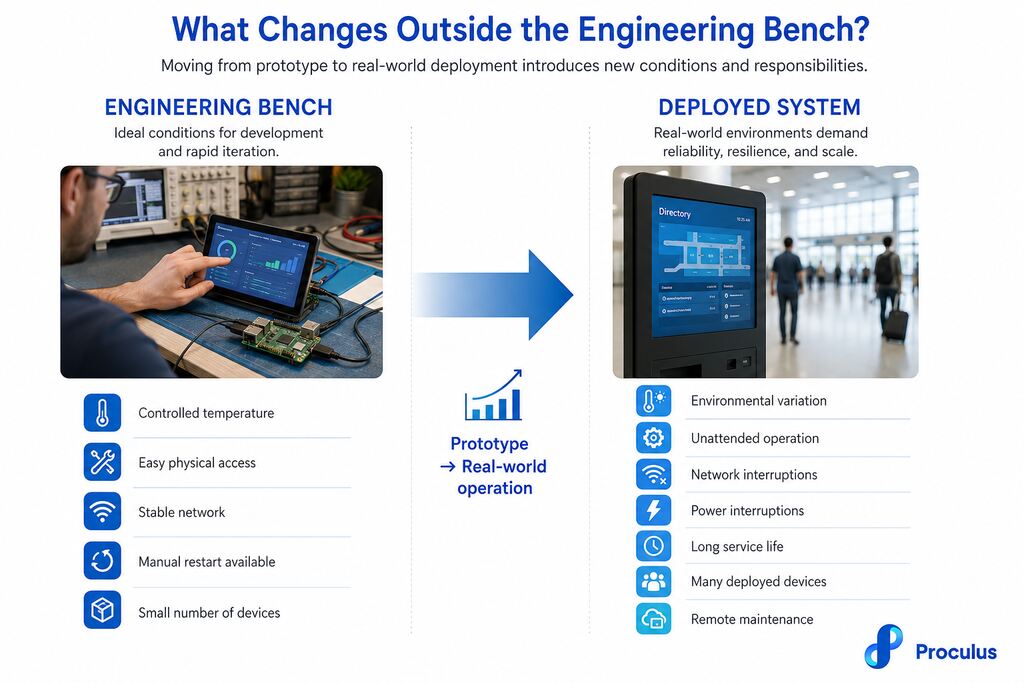
However, requirements change as a project moves from a prototype on an engineering bench to tens, hundreds, or thousands of deployed devices.
Display selection, thermal management, remote maintenance, component availability, and long-term reliability become increasingly important.
Understanding that transition helps engineering teams determine where Raspberry Pi fits within a product lifecycle and when a dedicated embedded platform becomes the better option.
Why is Raspberry Pi widely used for intelligent display development?
Raspberry Pi combines processing, graphics, connectivity, storage support, and general-purpose I/O within a compact single-board computer. Engineers can use Linux-based operating systems and familiar programming environments while connecting displays, sensors, controllers, cameras, and network interfaces. This makes the platform particularly effective for proof-of-concept development. A team building a touchscreen HMI, for example, can test the application and physical interface without first designing a custom computing board. HDMI and DSI provide practical options for graphical displays, while USB, GPIO, SPI, I2C, and UART support integration with external devices. Depending on the Raspberry Pi model, Wi-Fi, Bluetooth, and Ethernet can also simplify connected applications. Development speed is another advantage. Existing libraries, documentation, operating system support, and a large developer ecosystem allow engineers to focus on application behavior rather than building every software and hardware layer from the beginning.Which Raspberry Pi projects translate well into commercial deployments?
The strongest commercial use cases are generally applications where a graphical interface needs to communicate with users, equipment, or network services. Several common Raspberry Pi projects provide useful starting points for production systems.Digital signage
A Raspberry Pi can drive displays for menus, information boards, directories, advertising, production metrics, and internal communications. For prototypes and small installations, content can be stored locally or retrieved through a network connection. More advanced projects can integrate content management systems, scheduling, device monitoring, and automatic updates. Commercial deployments require additional attention to startup behavior, connectivity recovery, thermal conditions, storage endurance, and unattended operation. These requirements become especially relevant when screens are installed across multiple locations.Interactive kiosks
Touchscreen kiosks are another practical application. Raspberry Pi can run graphical interfaces for self-service terminals, check-in stations, product catalogs, information points, and ordering systems. The hardware can communicate with touchscreens and peripherals such as barcode scanners, printers, card readers, cameras, or sensors through standard interfaces. The prototype phase should reproduce the intended peripheral configuration as closely as possible. This helps identify driver, power, enclosure, and communication issues before deployment.Industrial dashboards
Raspberry Pi projects can also visualize information from industrial equipment, sensors, databases, or control systems. A dashboard might display production status, equipment conditions, alarms, energy consumption, or other operational data. Communication interfaces can connect the system to external controllers, while network connectivity enables access to centralized data sources. Industrial environments introduce additional requirements involving temperature, electrical noise, power stability, enclosure protection, and continuous operation. Engineers should evaluate these conditions independently rather than assuming a successful laboratory prototype will behave identically on the factory floor.Smart home control panels
Wall-mounted control panels can use Raspberry Pi to provide a central graphical interface for lighting, climate systems, security devices, energy monitoring, and other connected equipment. Touch support and network connectivity make the platform useful for developing and testing these interfaces. Engineers can also experiment with communication protocols and integrations before finalizing the product architecture. For commercial smart building or home automation products, enclosure design, startup time, power recovery, display lifetime, and long-term software maintenance should become part of the engineering requirements.Which displays work best with Raspberry Pi?
The right display depends on the project’s resolution, interface, touchscreen, environmental, mechanical, and lifecycle requirements. HDMI displays provide a straightforward option because video output is standardized and widely supported. They are particularly convenient for prototypes, kiosks, dashboards, and digital signage. DSI displays can provide a more integrated physical design where compatible hardware is available. Smaller projects may also use displays connected through SPI or other interfaces, although bandwidth and graphical requirements need to be considered. Touch technology matters as well. Capacitive touchscreens are commonly selected for modern graphical interfaces where responsive multi-touch interaction is important. Engineers should verify controller compatibility and driver support before selecting a panel for production. Brightness, viewing angle, operating temperature, resolution, mounting method, connector placement, and expected availability should all be evaluated alongside screen size.How should engineers design reliable Raspberry Pi-based systems?
Reliability depends on the complete system rather than the processor board alone. Power is one of the first considerations. An unstable or undersized supply can cause unexpected resets, peripheral failures, and storage corruption. The power architecture should account for the Raspberry Pi, display, USB peripherals, communication devices, and any additional electronics. Thermal behavior should be tested inside the final enclosure. A board that operates normally on an open development bench may experience higher temperatures once installed behind a display with restricted airflow. Storage also deserves attention. Systems that continuously write logs or application data can place significant demand on removable flash storage. Write frequency, storage technology, filesystem behavior, and recovery procedures should therefore be considered during system design. Engineers should also test boot behavior, power interruptions, network loss, peripheral failures, and application crashes. A deployed product should recover predictably from conditions that require manual intervention during development.
What are the limitations of Raspberry Pi in enterprise environments?
Raspberry Pi provides considerable flexibility, but enterprise deployments introduce requirements that may extend beyond the priorities of a general-purpose single-board computer. Hardware lifecycle is one consideration. An enterprise product may remain in production or service for many years, making component continuity and configuration stability important procurement requirements. Mechanical integration can also become challenging. Standard board layouts and connector locations may not match the enclosure, cabling, or I/O arrangement required by a finished product. Enterprise teams may also require specific operating temperatures, customized interfaces, controlled software images, certification support, or manufacturing consistency across large production runs. These limitations do not prevent Raspberry Pi from being deployed commercially. They indicate that engineers should evaluate the platform against the complete product specification rather than prototype performance alone.Frequently Asked Questions about Raspberry Pi projects
The questions below address common engineering considerations when using Raspberry Pi for intelligent display applications.Which Raspberry Pi model is best for display applications?
The appropriate model depends on display resolution, graphical workload, connectivity, peripheral requirements, power consumption, and physical constraints. Higher-performance models are useful for demanding graphical interfaces, while simpler applications may not require the additional processing capacity.How do you connect industrial touchscreens to Raspberry Pi?
Video and touch functions may use separate interfaces. HDMI can carry the display signal while USB handles touch input, for example. Other configurations can use DSI or specialized interfaces. Engineers should verify resolution, touch controller compatibility, drivers, power requirements, and operating system support.Is Raspberry Pi reliable enough for 24/7 operation?
Raspberry Pi can operate continuously when the complete system is engineered appropriately. Power quality, thermal management, storage endurance, enclosure design, software recovery, and environmental conditions all influence reliability. Continuous-operation requirements should be validated under realistic conditions before deployment.When should a Raspberry Pi prototype become a custom embedded solution?
The transition becomes relevant when production requirements exceed the practical limits of the prototype architecture. Common triggers include custom I/O requirements, mechanical constraints, environmental specifications, lifecycle requirements, component consolidation, certification needs, and increasing production volume.Move from Raspberry Pi prototypes to integrated intelligent display hardware
Raspberry Pi projects provide engineers with an efficient way to validate graphical interfaces, application logic, connectivity, and user interaction before committing to production hardware. The next stage requires an architecture designed around the operational and lifecycle requirements of the finished product. Proculus develops intelligent display solutions that integrate display hardware with processing, touchscreen functionality, communication interfaces, and embedded software platforms. Our portfolio includes Android LCD modules, UART TFT LCD modules, HDMI displays, and development solutions for embedded applications. Explore Proculus intelligent display products to compare platforms for prototypes, embedded systems, and commercial deployments!

PHP Code Snippets Powered By : XYZScripts.com