 English

Blog
What Is Arm Cortex? Cortex-A, Cortex-R, and Cortex-M Explained
 Choosing the right Arm Cortex processor is one of the most important decisions in an embedded project. It affects performance, operating system support, power consumption, response time, software complexity, and long-term product scalability.
For display-based applications, the processor choice becomes even more important. A simple control panel, an Android touchscreen interface, and a safety-critical industrial system may all use Arm-based technology, but they do not need the same type of processor.
Arm Cortex processors are generally divided into three main families: Cortex-A, Cortex-R, and Cortex-M. Each family is designed for a different type of embedded system.
This guide explains the differences clearly and helps you choose the right Arm Cortex solution for your LCD, HMI, or embedded display project.
Choosing the right Arm Cortex processor is one of the most important decisions in an embedded project. It affects performance, operating system support, power consumption, response time, software complexity, and long-term product scalability.
For display-based applications, the processor choice becomes even more important. A simple control panel, an Android touchscreen interface, and a safety-critical industrial system may all use Arm-based technology, but they do not need the same type of processor.
Arm Cortex processors are generally divided into three main families: Cortex-A, Cortex-R, and Cortex-M. Each family is designed for a different type of embedded system.
This guide explains the differences clearly and helps you choose the right Arm Cortex solution for your LCD, HMI, or embedded display project.
What Is an Arm Cortex Processor?
An Arm Cortex processor is a processor core based on the Arm architecture. Instead of manufacturing chips directly, Arm licenses processor core designs to semiconductor companies, which then build SoCs, microcontrollers, and application processors for different markets. The Cortex family is widely used in embedded systems because it offers a strong balance of performance, energy efficiency, scalability, and software ecosystem support. In practical terms, Arm Cortex processors can be found in:- Android-based embedded systems
- Industrial control panels
- Medical devices
- Smart home products
- Vending machines and kiosks
- Fitness equipment
- Microcontrollers and sensor devices
- Automotive and real-time control systems
Quick Comparison: Cortex-A vs Cortex-R vs Cortex-M
Not all Arm Cortex processors are designed for the same type of embedded system. Cortex-A is built for application-level performance, rich operating systems, and advanced user interfaces. Cortex-R is focused on real-time control, predictable response, and reliability in timing-critical environments. Cortex-M is optimized for microcontroller-based tasks where low power, low cost, and simple hardware control are the priority. The infographic below provides a quick visual breakdown of the three main Arm Cortex families. It highlights where each processor type fits best, what its main strengths are, and how it is typically used in embedded display and control applications: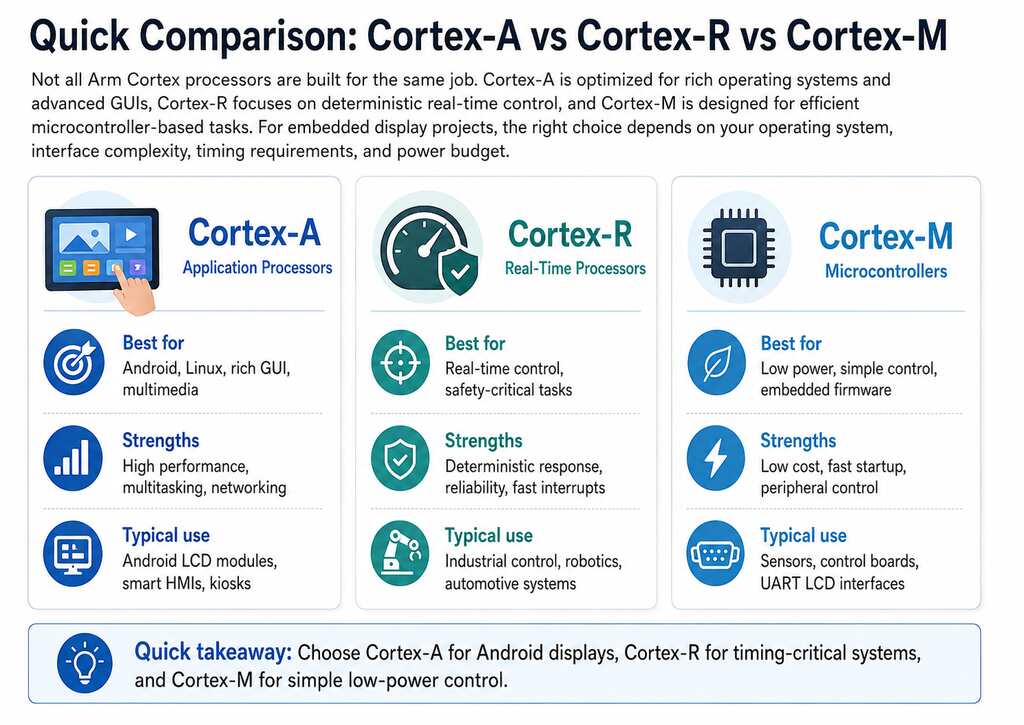
Cortex-A: Best for Android, Linux, and High-Performance Embedded Systems
Cortex-A processors are application processors designed for systems that need higher computing performance, memory management, and support for rich operating systems such as Android or Linux. This family is the best choice when your embedded product needs a modern user interface, multitasking, network connectivity, video playback, database access, cloud communication, or app-based development. A Cortex-A-based system is commonly used in:- Android LCD modules
- Industrial HMIs
- Smart control panels
- Medical device interfaces
- Retail kiosks
- Vending machines
- Digital signage
- Fitness equipment displays
- Smart home control systems
Cortex-R: Best for Real-Time and Safety-Critical Applications
Cortex-R processors are designed for real-time systems where timing, reliability, and deterministic response are critical. Unlike Cortex-A processors, which focus on application performance and rich operating systems, Cortex-R processors are optimized for tasks that must happen within strict time limits. This makes them suitable for systems where delayed response can affect safety, accuracy, or equipment performance. Cortex-R is commonly used in:- Automotive control systems
- Industrial drives
- Storage controllers
- Robotics
- Safety-related embedded systems
- High-reliability control applications
Cortex-M: Best for Microcontrollers, Low Power, and Simple Embedded Control
Cortex-M processors are designed for microcontrollers. They are widely used in embedded products that need low power consumption, low cost, fast startup, and direct control of hardware. Cortex-M is a strong fit for simple embedded tasks such as reading sensors, controlling motors, managing buttons, handling serial communication, or driving basic interfaces. Cortex-M is commonly used in:- Microcontroller-based products
- Sensor devices
- Small control boards
- Battery-powered systems
- Simple industrial controllers
- Smart home devices
- Peripheral control systems
- Basic LCD or UART display applications
Frequently Asked Questions About Arm Cortex
What is Arm Cortex?
Arm Cortex is a family of processor cores based on the Arm architecture. These processor cores are used in application processors, real-time processors, and microcontrollers for a wide range of embedded systems. The three main Cortex families are Cortex-A, Cortex-R, and Cortex-M.What is the difference between Cortex-A, Cortex-R, and Cortex-M?
Cortex-A is designed for high-performance application processing and rich operating systems such as Android and Linux. Cortex-R is designed for real-time applications that require predictable response and high reliability. Cortex-M is designed for microcontrollers, low-power devices, and simple embedded control. For display projects, Cortex-A is usually used for smart Android LCD modules, while Cortex-M is often used for simple control interfaces.Is Cortex-A better than Cortex-M?
Not always. Cortex-A is more powerful and better for Android, Linux, multimedia, and advanced graphical interfaces. Cortex-M is better for low-power, low-cost, simple control tasks. The better choice depends on the application. If your project needs Android and a rich touchscreen interface, choose Cortex-A. If your project only needs basic control and serial communication, Cortex-M may be enough.Is Arm Cortex-A53 good for embedded applications?
Yes. Arm Cortex-A53 is widely used in embedded applications that need a balance of performance and power efficiency. It is suitable for Android, Linux, smart displays, industrial interfaces, and connected devices.Proculus Arm-Based Display Solutions
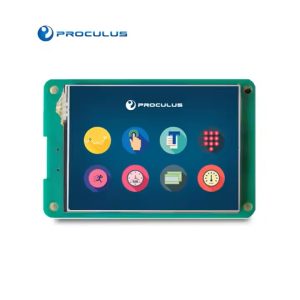
Proculus provides intelligent display solutions for embedded and industrial applications, including Android LCD Modules, UART TFT LCD Modules, HDMI Displays, and P.BOX development kits. For projects that need Android, touch interaction, app development, and flexible connectivity, Proculus Android LCD Modules provide a ready-to-integrate Arm-based platform. They are suitable for applications such as industrial control panels, medical devices, vending machines, fitness equipment, smart home systems, kiosks, and automation equipment. For simpler microcontroller-based projects, Proculus UART TFT LCD Modules can help reduce GUI development complexity with serial communication and PC-based interface design tools. For systems that already have an HDMI output, Proculus HDMI Displays provide touchscreen display options for equipment based on Raspberry Pi, mini PCs, or other computing platforms. Whether your project requires a simple control display or a complete Android touchscreen system, Proculus can support your team with display modules, customization options, and technical guidance. Explore the full range of Proculus display products and choose the right Arm-based LCD solution for your next embedded project!

PHP Code Snippets Powered By : XYZScripts.com