 English

Blog
Development Boards for Intelligent Display Projects: How to Choose the Right Platform for Embedded Systems
Development boards give engineering teams a practical way to validate processing, connectivity, display behavior, software architecture, and peripheral integration before committing to custom hardware.
For intelligent display projects, however, choosing a board based only on CPU speed or memory can lead to unnecessary complexity later in development.
Display interface support, graphics requirements, operating system architecture, boot behavior, real-time control, peripheral buses, power consumption, software maintenance, and long-term component availability can all affect whether a prototype can become a reliable commercial product.
A Raspberry Pi may be appropriate for a Linux-based HMI with HDMI output and a complex application stack, while an ESP32 or Arduino-based platform may be more efficient when the host only needs to exchange data with an intelligent UART display.
Other projects may benefit from a Linux SBC such as BeagleBone or from an integrated Android display architecture.
The right development board is therefore not necessarily the most powerful platform, but the one that meets the application’s technical requirements without introducing processing, software, or supply-chain complexity that the final product does not need.
What is a development board, and when should you use?
A development board is a ready-to-use hardware platform built around a microcontroller, microprocessor, System on Chip (SoC), or System on Module (SoM). It typically exposes interfaces such as GPIO, UART, SPI, I²C, USB, Ethernet, CAN, Wi-Fi, or display outputs so engineers can develop and test a system without first designing a custom PCB. Development boards are particularly useful during proof-of-concept and early prototyping because they allow teams to answer important architectural questions quickly:- Can the processor handle the intended application?
- Is there enough RAM and nonvolatile storage?
- Can the platform drive the selected display?
- Are the required communication buses available?
- Does touch input work reliably?
- How long does the system take to boot?
- Can it communicate with sensors, controllers, and external equipment?
- Is the software environment appropriate for deployment?
- What thermal and power requirements will the final design have?
Which hardware specifications matter most for intelligent display applications?
Processor performance is important, but it should be evaluated in relation to where graphical processing occurs. When the development board renders a complete graphical interface locally, the CPU or GPU may need to handle animations, application logic, networking, data processing, and touch interaction simultaneously. Higher-resolution interfaces and multimedia applications generally require more processing and graphics capability. An intelligent UART display changes that architecture. The host controller can exchange commands and variables with the display instead of rendering every graphical element itself. Proculus UART TFT LCD modules, for example, are designed to handle GUI elements on the display while communicating with the controller through serial interfaces. Engineers should evaluate at least the following hardware characteristics:- CPU and architecture: Determine whether the application requires a microcontroller, an application processor, or a more capable SBC.
- RAM: Graphical applications, web frameworks, databases, buffering, and multitasking can increase memory requirements significantly.
- Nonvolatile storage: Consider firmware size, operating system images, application assets, logs, configuration files, and future updates.
- GPU or graphics acceleration: This becomes important when the host is responsible for rendering sophisticated interfaces.
- GPIO availability: Check both the number of pins and their electrical characteristics;
- Communication peripherals: UART, RS232, RS485, SPI, I²C, CAN, USB, and Ethernet requirements should be identified before board selection.
- Wireless connectivity: Wi-Fi and Bluetooth may simplify connected products but also affect cybersecurity, certification, software maintenance, and power requirements.
- Power consumption: A board suitable for a bench prototype may consume more power than the final embedded product can tolerate.
- Operating temperature: Industrial and outdoor environments may require temperature ranges beyond those of standard development hardware.
Which display interfaces should engineers evaluate?
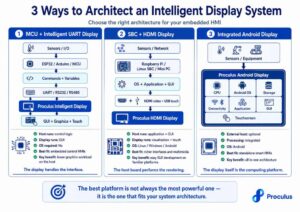
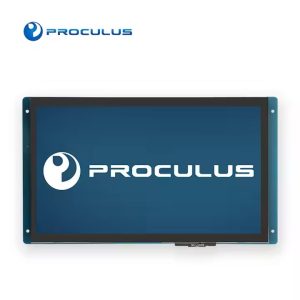
Display architecture often determines which development boards are practical. HDMI is convenient when the host platform performs the rendering. It is widely supported by SBCs and simplifies early GUI development because the display behaves much like an external monitor. Proculus HDMI displays, for example, are designed as open-frame IPS displays for integration with platforms including Raspberry Pi and systems running Linux, Windows, Android, and macOS. MIPI DSI is commonly used for direct display connections in embedded computing platforms. It can provide an efficient integrated interface, although compatibility depends on the processor, drivers, panel, connector, and board design. Parallel RGB/DPI gives the processor direct access to the display interface but consumes more pins and usually requires greater attention during PCB design. Raspberry Pi hardware, for example, can expose a parallel DPI interface through GPIO in addition to dedicated display interfaces. SPI is straightforward and uses relatively few pins, making it practical for smaller displays and microcontroller-based systems. Bandwidth, however, can become a limitation for high-resolution interfaces or high frame rates. UART takes a different approach. Instead of transferring framebuffer data, the controller can exchange values and commands with an intelligent display. This can substantially reduce the graphical workload placed on the MCU. Proculus UART displays support serial options including TTL/CMOS, RS232, and RS485 depending on the model. Engineers should also distinguish between the video interface and the touch interface. An HDMI display, for example, may use HDMI for video while touch data travels separately through USB. In practice, these interface choices can lead to very different system architectures, depending on whether the host controller, the display, or an integrated platform is responsible for processing and rendering the HMI. The infographic below illustrates three common approaches:
Frequently Asked Questions about development boards
Which development board is best for industrial display applications?
There is no single development board that is best for every industrial display system. The decision should start with application requirements: graphical complexity, communication interfaces, boot time, real-time behavior, environmental requirements, cybersecurity, power consumption, and long-term availability. For a production system, engineers should also determine whether the development board itself will remain in the final architecture or whether it is being used to validate a future custom design.Which display interfaces are most common on embedded development boards?
Common interfaces include HDMI, MIPI DSI, RGB/DPI, SPI, and UART, although availability depends on the platform. HDMI is frequently found on Linux-capable SBCs and is convenient when the host renders the graphical interface. SPI is commonly used with smaller displays connected to microcontrollers. MIPI DSI and parallel RGB interfaces can provide direct panel connectivity in integrated designs. UART is often used with intelligent display modules that perform graphical functions internally and exchange commands or variables with the host controller. Touch input may use a different connection from the video interface, such as USB or I²C, so engineers should evaluate both independently.How do you choose a development board for long-term product availability?
Start by separating prototyping requirements from production requirements. Before selecting a board for a commercial design, evaluate the manufacturer’s lifecycle commitments, hardware revision policy, processor availability, documentation, software support, supply chain, operating temperature, certifications, and expected production volume. Teams should also assess how difficult it would be to migrate away from the board if necessary. Software that depends heavily on board-specific drivers or proprietary interfaces can increase future redesign costs. For long-lived products, the lowest purchase price is rarely the only relevant metric. Lifecycle stability and engineering continuity can have a much larger impact on total cost.Build Your Next Intelligent Display Project with Proculus
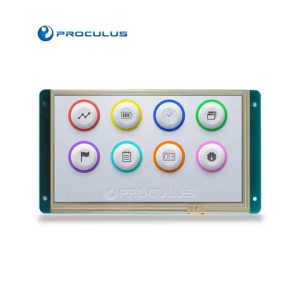
The development board is only one part of the HMI architecture. The right display can reduce the processing and integration work required from the host platform. Proculus provides several approaches for different embedded system architectures. UART TFT LCD modules can communicate directly with microcontrollers and allow GUI development through UnicView Studio. HDMI displays provide an open-frame display option for Raspberry Pi, Linux systems, mini PCs, and other HDMI-capable platforms. Android LCD modules combine the display, processing platform, operating system, storage, and connectivity into an integrated solution. Whether your prototype uses Raspberry Pi, Arduino, ESP32, BeagleBone, a custom controller, or another embedded platform, display selection should reflect the architecture you intend to take into production. Explore Proculus Tech display solutions and compare options for your next embedded project!

PHP Code Snippets Powered By : XYZScripts.com